Assets in a Box
(AIB)
Infrastructure asset discovery and dependency mapping. Parse Terraform, Kubernetes, Ansible, Docker Compose, CloudFormation, and Pulumi — see what depends on what, and what breaks if it fails.
Your infrastructure is spread across Terraform, Kubernetes, Ansible, Docker Compose, CloudFormation, and Pulumi — but do you know what depends on what? AIB builds a dependency graph from your infrastructure-as-code, stores it in SQLite, and gives you blast radius analysis, drift detection, certificate tracking, and security audit — all from a single ~15 MB binary with zero external dependencies.
⚡ Quick Start
# Install
git clone https://github.com/matijazezelj/aib.git && cd aib && make build
# or: go install github.com/matijazezelj/aib/cmd/aib@latest
# or: docker compose -f deploy/docker-compose.yml up --build

# Scan & explore
aib scan terraform /path/to/terraform.tfstate
aib scan k8s /path/to/manifests/
aib serve   # http://localhost:8080
Typical workflow: scan sources → query the graph or open the UI → run graph audit → re-scan to track drift.
Open http://localhost:8080 and explore your infrastructure graph.
📋 Prerequisites
| Requirement | Minimum |
|---|---|
| Go | 1.25+ |
| Docker | 20.10+ (for Docker deployment) |
| terraform CLI | Required for remote state scanning |
| kubectl | Required for live cluster scanning |
| helm | Required for Helm chart scanning |
🧠 How It Works
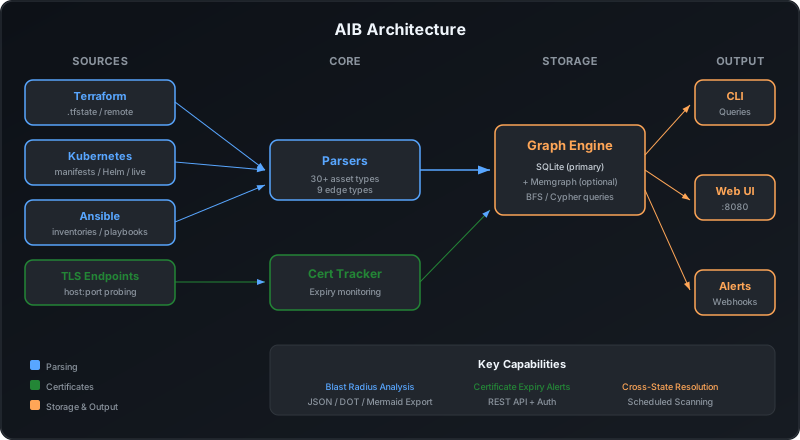
- Parse: Scan Terraform state files, Kubernetes manifests, Helm charts, and Ansible inventories
- Map: Build a unified dependency graph with automatic cross-state edge resolution
- Analyze: Run blast radius queries, track certificates, and export graphs
- Visualize: Interactive web UI with search, filtering, and impact highlighting
🗺️ What You Get
| Component | Technology | Purpose |
|---|---|---|
| Parsers | Go | 7 scanners: Terraform state/plan, K8s/Helm, Ansible, Docker Compose, CloudFormation, Pulumi |
| Graph Engine | SQLite + Memgraph | Asset storage with graph traversal queries |
| Blast Radius | BFS / Cypher | “What breaks if X fails?” analysis |
| Security Audit | 20 built-in checks | Critical/warning/info findings with visual indicators |
| Drift Detection | Source-scoped diffing | Track added/removed/modified assets across scans |
| Graph Analysis | BFS | Cycle detection, single points of failure, orphan nodes |
| Cert Tracker | TLS Prober | Certificate expiry monitoring and alerting |
| Web UI | Cytoscape.js | Interactive graph visualization with focus modes and AWS icons |
| REST API | Go HTTP + OpenAPI 3.0.3 | 22 endpoints, Swagger UI at /api/docs, auth, rate limiting |
| Alerting | Webhooks, Slack, Teams | Certificate expiry and scan notifications |
| Export | JSON / DOT / Mermaid | Graph export for documentation and CI/CD |
🏗️ Supported Sources
AIB ships with seven parsers. Pass multiple paths to any scanner; cross-file references are resolved automatically.
| Scanner | Resource types | Key features |
|---|---|---|
| Terraform state | 100+ (AWS/GCP/Azure/Cloudflare/TLS) | Attribute edges, security metadata, remote backends |
| Terraform plan | Same as state | Pre-deploy impact; actions classified as create/update/delete/replace |
| Kubernetes / Helm | Workloads, Services, Ingresses, Secrets, ConfigMaps, Certificates | Security contexts, selector edges, env-var connects_to inference, live cluster scanning |
| Ansible | Hosts, containers, services | Inventory-var dependency inference, connection strings |
| Docker Compose | Services, networks, volumes | depends_on, network membership, volume mounts |
| CloudFormation | ~40 (AWS) | Ref, Fn::GetAtt, DependsOn, property references |
| Pulumi | ~80 (AWS/GCP/Azure/K8s/TLS) | Dependency arrays, attribute refs, parent URNs |
# Terraform
aib scan terraform *.tfstate                          # multiple state files
aib scan terraform --remote --workspace='*' project/  # remote backends

# Kubernetes / Helm
aib scan k8s manifests/ --helm --values=values.yaml   # Helm chart
aib scan k8s --live --namespace=app                   # live cluster

# Ansible
aib scan ansible inventory.ini --playbooks=./playbooks/

# Docker Compose
aib scan compose docker-compose.yml

# CloudFormation
aib scan cloudformation vpc.yaml database.json

# Pulumi
aib scan pulumi stack-export.json
Terraform Providers
| Provider | Resources |
|---|---|
| GCP | Compute instances, Cloud SQL, Redis, networks, subnets, firewalls, DNS, storage buckets, load balancers |
| AWS | EC2, RDS, VPCs, subnets, security groups, Route53, S3, ALB/ELB |
| Azure | VMs, SQL servers, PostgreSQL, virtual networks |
| Cloudflare | DNS records |
| TLS | Self-signed certs, ACME certificates |
🔎 Analysis
💥 Blast Radius
The core feature. Ask “what breaks if this asset fails?” and get a tree of affected resources:
$ aib impact node tf:network:prod-vpc

Impact Analysis: tf:network:prod-vpc
   Type: network | Provider: google | Source: terraform

   Blast Radius: 4 affected assets

   tf:network:prod-vpc (network)
   ├── [connects_to] tf:subnet:prod-subnet (subnet)
   │   └── [connects_to] tf:vm:web-prod-1 (vm)
   │       └── [depends_on] tf:dns_record:web.example.com (dns_record)
   └── [depends_on] tf:database:cloudsql-prod (database)
AIB discovers 30+ asset types and 9 relationship types across all sources. When scanning multiple state files, cross-state edges resolve automatically — a VM in one state file links to a network defined in another.
🔐 Security Audit
Runs 20 checks across three severities:
| Severity | Checks |
|---|---|
| Critical | Public databases, unencrypted storage, world-open firewall rules, privileged containers, host namespace usage |
| Warning | No deletion protection, single-AZ databases, public buckets, public load balancers, public VMs, privilege escalation, root execution, unencrypted ingress |
| Info | Orphan secrets, missing container resource limits, absent encryption config |
aib graph audit
aib -o json graph audit | jq '.findings[] | select(.severity == "critical")'
The web UI highlights findings on nodes: red border for critical, orange for warning.
🔄 Drift Detection
Every scan automatically diffs against the current database and reports added/removed/modified assets. Drift is source-scoped, so a Terraform scan never flags Kubernetes nodes as removed.
📊 Graph Analysis
aib graph cycles                           # circular dependencies
aib graph spof --min-affected=3            # single points of failure
aib graph orphans                          # unconnected nodes
🔐 Certificate Management
Track TLS certificates across your infrastructure:
# Probe a TLS endpoint
aib certs probe example.com:443

# List all tracked certificates
aib certs list

# Show certificates expiring within 30 days
aib certs expiring --days=30

# Re-probe all known endpoints from the graph
aib certs check
Automatic Probing
When running aib serve, certificates are probed automatically on a schedule:
certs:
  probe_enabled: true
  probe_interval: "6h"
  alert_thresholds: [90, 60, 30, 14, 7, 1]
The scheduler discovers TLS endpoints from the graph (ingresses, load balancers, DNS records), probes them, and sends alerts via configured backends when certificates are expiring.
🌐 Web UI
The embedded web UI provides:
- Interactive graph visualization with Cytoscape.js
- Distinct node shapes per asset category (rectangles for compute, diamonds for data, hexagons for networking)
- Search and filter by asset type and source
- Blast radius highlighting for selected nodes
- Node detail panel showing metadata, relationships, and impact analysis
- Scan Now button to trigger scans from the browser
📡 REST API
Full API with authentication, rate limiting, and OpenAPI 3.0.3 spec. Interactive docs at /api/docs (Swagger UI).
| Method | Path | Description |
|---|---|---|
GET |
/healthz |
Health check |
GET |
/api/v1/graph |
Full graph (nodes + edges) |
GET |
/api/v1/graph/nodes |
List nodes (filter by type, source, provider) |
GET |
/api/v1/graph/nodes/:id |
Single node details |
GET |
/api/v1/graph/edges |
List edges (filter by type, from, to) |
GET |
/api/v1/impact/:nodeId |
Blast radius for a node |
GET |
/api/v1/graph/analysis/audit |
Security audit findings |
GET |
/api/v1/graph/analysis/cycles |
Circular dependencies |
GET |
/api/v1/graph/analysis/spof |
Single points of failure |
GET |
/api/v1/graph/analysis/orphans |
Unconnected nodes |
GET |
/api/v1/plan/impact |
Terraform plan impact analysis |
GET |
/api/v1/scans/{id}/diff |
Drift summary for a scan |
GET |
/api/v1/certs |
All tracked certificates |
GET |
/api/v1/certs/expiring |
Expiring certs (filter by days) |
GET |
/api/v1/stats |
Summary statistics |
POST |
/api/v1/scan |
Trigger a scan |
GET |
/api/v1/openapi.json |
OpenAPI spec |
GET |
/metrics |
Prometheus metrics |
Security
- Bearer token authentication on
/api/*routes - Rate limiting: 10 req/sec (burst 20) per client IP
- Security headers (CSP, X-Frame-Options, X-Content-Type-Options)
- Request body limits (1 MB)
- Path validation (directory traversal prevention)
- CORS (disabled by default, configurable)
⚙️ Configuration
AIB works out of the box with sensible defaults. Customize via aib.yaml:
storage:
  path: "./data/aib.db"
  memgraph:
    enabled: false
    uri: "bolt://localhost:7687"

server:
  listen: ":8080"
  api_token: "${AIB_API_TOKEN}"

scan:
  schedule: "4h"
  allowed_paths: ["/opt/infra"]

certs:
  probe_enabled: true
  probe_interval: "6h"
  alert_thresholds: [90, 60, 30, 14, 7, 1]

alerts:
  stdout:
    enabled: true
  webhook:
    enabled: false
    url: "http://sib:8080/api/v1/events"
    headers:
      Authorization: "Bearer ${AIB_WEBHOOK_TOKEN}"
  slack:
    enabled: false
    webhook_url: "https://hooks.slack.com/..."
  teams:
    enabled: false
    webhook_url: "https://example.webhook.office.com/..."
All settings support environment variables with the AIB_ prefix. Sensitive fields support ${ENV_VAR} expansion.
🗄️ Memgraph Integration
AIB uses a hybrid storage model: SQLite is the persistent source of truth, and Memgraph is an optional graph engine for faster traversal queries.
# Start Memgraph
docker run -p 7687:7687 memgraph/memgraph-mage

# Enable in config
# storage.memgraph.enabled: true

# Sync existing data
aib graph sync
- Writes go to both SQLite and Memgraph
- Graph queries (blast radius, neighbors, shortest path) use Memgraph’s Cypher engine
- If Memgraph is unavailable, all queries fall back to the local BFS engine
- SQLite stays the source of truth — Memgraph can be rebuilt at any time
📤 Graph Export
Export your infrastructure graph for documentation and CI/CD:
aib graph export --format=json      # JSON (default)
aib graph export --format=dot       # Graphviz DOT
aib graph export --format=mermaid   # Mermaid diagram
🛠️ Commands Reference
# Scanning
aib scan terraform <path...>              # Scan Terraform state files
aib scan terraform --remote <path...>     # Pull from remote backend
aib scan k8s <path...>                    # Scan K8s manifests
aib scan k8s --helm <path>               # Scan Helm chart
aib scan k8s --live                       # Scan live cluster
aib scan ansible <path...>               # Scan Ansible inventories

# Graph queries
aib graph show                            # Graph summary
aib graph nodes [--type= --source=]       # List nodes
aib graph edges [--type= --from=]         # List edges
aib graph neighbors <node-id>             # Direct connections
aib graph export [--format=json|dot|mermaid]  # Export graph
aib graph sync                            # Sync to Memgraph

# Impact analysis
aib impact node <node-id>                 # Blast radius

# Certificate management
aib certs list                            # All tracked certs
aib certs expiring [--days=30]            # Expiring certs
aib certs probe <host:port>               # Probe TLS endpoint
aib certs check                           # Re-probe all endpoints

# Web UI + API
aib serve [--listen=:8080] [--read-only]  # Start server
🔄 AIB vs Other Tools
| AIB | Cartography | CloudQuery | Steampipe | inframap | Rover | terraform graph | Backstage | |
|---|---|---|---|---|---|---|---|---|
| Approach | Parse IaC files locally | Live API discovery | Sync cloud APIs to SQL | SQL over live APIs | Visualise TF state | Visualise TF state/plan | Built-in TF command | Service catalog |
| IaC sources | TF, K8s, Ansible, Compose, CFn, Pulumi | None (API only) | None (API only) | None (API only) | Terraform only | Terraform only | Terraform only | Manual YAML |
| Graph DB | SQLite + optional Memgraph | Neo4j (required) | PostgreSQL | Embedded Postgres | None | None | None | PostgreSQL |
| Blast radius | Built-in | No | No | No | No | No | No | No |
| Drift detection | Built-in | No | No | No | No | No | No | No |
| Security audit | 15 checks | Limited | Via policies | Via mods | No | No | No | Via plugins |
| Cert tracking | Built-in | No | No | No | No | No | No | No |
| Self-hosted | Yes (single binary) | Yes (complex) | Yes | Yes | Yes | Yes | Yes | Yes (complex) |
| Dependencies | None (SQLite) | Neo4j | PostgreSQL | N/A | None | None | None | PostgreSQL |
| Size | ~15 MB binary | Heavy | Medium | Medium | Small | Small | Built-in | Heavy |
Key differences:
- No cloud credentials required — AIB parses IaC files that already exist in your repo; it never calls cloud APIs.
- Multi-source in one graph — Terraform, Kubernetes, Ansible, Compose, CloudFormation, and Pulumi assets land in a single unified graph, enabling cross-stack blast-radius analysis.
- All-in-one binary — drift detection, TLS certificate tracking, security audit (15 checks), SPOF/cycle/orphan analysis, and a web UI ship in a single ~15 MB binary with zero external dependencies.
👥 Who This Is For
- Infrastructure teams who need to understand dependencies across multi-cloud environments
- SREs planning disaster recovery or assessing change impact
- Security teams running blast radius analysis for risk assessment
- DevOps engineers tracking certificate lifecycles across infrastructure
- Anyone managing Terraform, Kubernetes, or Ansible who wants a unified view
Who This Is NOT For
- Teams that need a full service catalog with developer portal features — use Backstage
- Organizations using only one cloud with built-in dependency views
- People who need real-time infrastructure monitoring — use OIB for that
⚠️ Known Limitations
- Single-instance — no clustering; suitable for up to ~10K assets
- No built-in TLS — use a reverse proxy for HTTPS
- Single API token — no per-user RBAC
- Partial parser coverage — not all provider resource types are mapped
- Internal networks only — do not expose directly to the internet
📄 License
Apache 2.0 License — use it, modify it, build on it.
Ready to map your infrastructure?
View on GitHub🚀 Need Help Getting Started?
Self-hosting is free and always will be. But if you'd rather have it deployed, configured, and maintained for you — I can help.