NIDS in a Box
(NIB)
One-command network security monitoring with Suricata IDS and CrowdSec collaborative threat response.
Most network security tools detect and alert — they assume someone is watching. NIB detects, blocks, and shares: Suricata finds threats, CrowdSec blocks them automatically, and the community network means you benefit from attacks detected by millions of other nodes before they reach you.
🎯 IDS vs IPS: What NIB Actually Does
IDS = Intrusion Detection System (passive monitoring, alerts only)
IPS = Intrusion Prevention System (inline blocking, drops packets in real-time)
NIB operates in two modes:
| Mode | How It Works | Blocking | Best For |
|---|---|---|---|
| Local (default) | NIB runs on the host you protect | iptables blocks on that host | Internet-facing servers |
| Sensor (mirror/SPAN) | NIB receives mirrored traffic | Pushes bans to router/firewall | Dedicated IDS, full network visibility |
Sensor Mode (Port Mirror)
When using a port mirror/SPAN, NIB is:
- ✅ IDS: Suricata detects threats in real-time
- ⚠️ Delayed IPS: CrowdSec pushes blocks to your router, but it’s not instant — the first packets get through before the ban kicks in (1-5 seconds)
This is not inline IPS. For real-time packet dropping, traffic would need to flow through NIB.
Local Mode
When NIB runs directly on a server (not mirrored), the iptables bouncer is a real IPS for that host.
⚡ Quick Start
# Clone and configure
git clone https://github.com/matijazezelj/nib.git && cd nib
cp .env.example .env  # Set SURICATA_INTERFACE

# Install everything
make install

# Open Grafana dashboard
make open
Open Grafana at http://localhost:3001 and explore four pre-built dashboards.
📋 Prerequisites
| Requirement | Minimum |
|---|---|
| Docker | 20.10+ |
| Docker Compose | v2+ |
| Linux | Kernel 4.15+ (for AF_PACKET) |
| RAM | 2 GB |
| Disk | 10 GB |
Note: Suricata requires
network_mode: hostandNET_ADMIN+NET_RAWcapabilities for packet capture. CrowdSec’s firewall bouncer requiresNET_ADMINfor iptables access.
Hardware Sizing by Link Speed
| Link Speed | CPU | RAM | Storage | Example Hardware |
|---|---|---|---|---|
| 100 Mbps | 2 cores | 2 GB | 20 GB | Raspberry Pi 4, any old PC |
| 500 Mbps | 4 cores | 4 GB | 50 GB | Intel N100 mini PC, NUC |
| 1 Gbps | 4-6 cores | 8 GB | 100 GB | Intel N305, i5 NUC, old desktop |
| 2.5 Gbps | 8 cores | 16 GB | 200 GB | i5/i7 desktop, Ryzen 5 |
| 10 Gbps | 16+ cores | 32 GB | 500 GB+ | Xeon/EPYC server |
NIC recommendations:
- 1 Gbps: Any Intel NIC (i210, i350) — avoid Realtek for high packet rates
- 2.5 Gbps: Intel i225-V, Realtek RTL8125
- 10 Gbps: Intel X520/X540, Mellanox ConnectX-3/4 (requires kernel drivers)
Notes:
- VMs work great — just ensure virtio or SR-IOV passthrough for high speeds
- WiFi capture is limited — no promiscuous mode on most drivers
- 10 Gbps requires careful tuning (RSS, CPU affinity, ring buffers)
🧠 How It Works
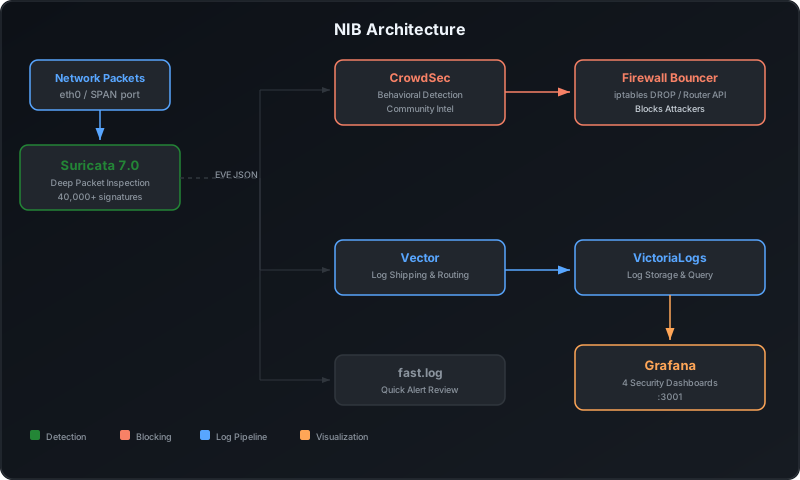
- Detect: Suricata inspects every packet with 40,000+ signatures and 20+ protocol parsers
- Block: CrowdSec automatically bans attacking IPs — on the host, on your router, or at your CDN
- Share: Attack data is shared with the CrowdSec community. You contribute signals, you receive a curated blocklist from millions of other nodes
🛡️ What You Get
| Component | Technology | Purpose |
|---|---|---|
| Network IDS | Suricata | Deep packet inspection with ET Open + abuse.ch signatures |
| Custom Rules | Suricata | 30+ built-in rules (DNS exfil, C2 beaconing, crypto mining, lateral movement, reverse shells) |
| Protocol Analysis | Suricata | HTTP, DNS, TLS, SMB, SSH, and 20+ protocol parsers |
| TLS Fingerprinting | Suricata | JA3/JA4 fingerprints to identify malware and suspicious clients |
| DNS Monitoring | Suricata | Full query/response logging, NXDOMAIN tracking for DGA detection |
| Behavioral Detection | CrowdSec | Pattern-based attack detection (brute force, scans, exploits) |
| Automated Blocking | CrowdSec Bouncer | iptables DROP for banned IPs |
| Community Intel | CrowdSec Network | Shared threat intelligence from millions of nodes |
| Log Storage | VictoriaLogs | Fast log aggregation and querying |
| Log Shipping | Vector | Structured log routing from Suricata to storage |
| Visualization | Grafana | Four pre-built security dashboards |
🎯 What Gets Detected
Out of the box, NIB catches:
| Category | Examples |
|---|---|
| Network Scans | Port scans, service enumeration, Nmap signatures |
| Exploit Attempts | CVE exploits, shellcode, buffer overflows |
| Malware Traffic | C2 callbacks, known malware signatures, crypto mining |
| DNS Anomalies | DGA domains, NXDOMAIN floods, DNS tunneling indicators |
| TLS Anomalies | Known-bad JA3/JA4 fingerprints, expired certificates |
| Protocol Abuse | HTTP attacks, SMB exploits, SSH brute force |
| Trojan Activity | Outbound connections to suspicious ports, reverse shells |
All detections use the Community ID standard for cross-tool flow correlation.
📊 Security Dashboards
| Dashboard | Description |
|---|---|
| Network Security Overview | Alert timeline, top signatures, source/dest IPs, attack categories |
| DNS Analysis | Query volume, top domains, NXDOMAIN tracking, client activity |
| TLS & Fingerprints | TLS versions, JA3/JA4 hashes, SNI analysis, certificate issues |
| CrowdSec Decisions | Blocked vs allowed traffic, banned IPs, blocked signatures |
🔌 Bouncer Modes
NIB supports two deployment modes:
Local Mode (default)
Blocks attackers on the NIB host using iptables. Best when NIB runs directly on the machine you want to protect.
CrowdSec Engine → iptables bouncer → DROP on this host
Sensor Mode (remote router/firewall)
No local bouncer. CrowdSec’s LAPI is exposed so external bouncers can pull decisions. Use this when NIB is a sensor and blocking should happen on a separate router or firewall.
CrowdSec Engine (LAPI exposed on :8080)
    ├──→ pfSense / OPNsense (native CrowdSec plugin)
    ├──→ MikroTik / OpenWrt (router sync script)
    ├──→ Cloudflare / AWS WAF (CDN bouncer)
    └──→ nginx / HAProxy (web server bouncer)
# In .env
BOUNCER_MODE=sensor
ROUTER_TYPE=mikrotik
ROUTER_URL=https://192.168.1.1
ROUTER_USER=admin
ROUTER_PASS=your-password

# Start continuous sync
make router-sync-daemon
Supported routers:
| Router | How It Blocks |
|---|---|
| MikroTik (RouterOS 7+) | Address list via REST API |
| pfSense | Native CrowdSec plugin |
| OPNsense | Native CrowdSec plugin |
| OpenWrt | ipset/nftables set via luci-rpc |
| Any REST API | Generic JSON webhook |
| Cloudflare | CDN edge blocking |
| AWS WAF | Cloud WAF rules |
| nginx | HTTP access control |
| HAProxy | Backend blocking |
🏗️ Where to Deploy
Linux Router / Gateway (best coverage)
Suricata sees all traffic, iptables blocks before packets reach internal hosts.
Port Mirror / SPAN (dedicated sensor)
Configure a SPAN port on your switch to copy traffic to a dedicated NIB host. Use sensor mode to push blocks to your actual firewall.
Individual Server (protect one host)
Monitor and protect a single Linux server. Suricata sees traffic to/from that host, iptables blocking is fully effective.
Alongside SIB (defense in depth)
Run both on the same host for complementary coverage:
- SIB (Falco) watches syscalls: file access, process execution, container activity
- NIB (Suricata) watches network: traffic patterns, DNS, TLS, protocol anomalies
Separate Docker networks, separate storage, separate Grafana instances (SIB on port 3000, NIB on port 3001).
⚙️ Configuration
Key environment variables in .env:
| Variable | Default | Description |
|---|---|---|
SURICATA_INTERFACE |
eth0 | Network interface to monitor |
HOME_NET |
RFC1918 ranges | Your internal network definition |
BOUNCER_MODE |
local | local (iptables) or sensor (remote bouncers) |
CROWDSEC_ENROLL_KEY |
(none) | CrowdSec community enrollment key |
GRAFANA_PORT |
3001 | Grafana port (avoids SIB conflict on 3000) |
ROUTER_TYPE |
(none) | Router type for sensor mode sync |
PRIVACY_MODE |
(none) | Set to alerts-only for privacy-conscious deployments |
Port Mirroring (Sensor Mode)
| Switch | Setup Guide |
|---|---|
| UniFi | Ports tab → Port Mirroring → Select source/destination |
| TP-Link Omada | Ports tab → Port Mirroring (IDS only, no bouncer yet) |
| MikroTik | Full support with ROUTER_TYPE=mikrotik |
| Cisco | Monitor session CLI or web UI |
| Netgear | Monitoring → Mirroring |
🔒 Privacy Mode
By default, NIB ships full protocol metadata to storage (DNS queries, HTTP URLs, TLS SNI, flow records). For privacy-conscious deployments, restrict what reaches dashboards:
# In .env
PRIVACY_MODE=alerts-only
What alerts-only does:
- Only
alertandstatsevents are shipped to VictoriaLogs - DNS, HTTP, TLS, flow events are dropped at the Vector level
- Alert events keep: 5-tuple (src/dst IP + port, protocol), timestamp, signature ID/name, severity, action, community ID
- Alert events strip: app-layer fields (
http.*,tls.*,dns.*), payload, packet data, alert metadata - Suricata still logs everything locally (CrowdSec needs the full stream for behavioral detection)
Dashboard impact: | Dashboard | Status | |———–|——–| | Network Security Overview | Works (uses alert data) | | CrowdSec Decisions | Works (uses alert + stats) | | DNS Analysis | Empty (dns events not shipped) | | TLS & Fingerprints | Empty (tls events not shipped) |
🔐 Security Hardening
NIB runs with elevated privileges — it’s part of your trust boundary. For production deployments:
- Threat Model — What NIB detects, what it doesn’t, and what happens if NIB itself is compromised
- Production Checklist — Step-by-step hardening checklist
- Known Limitations — WiFi capture, NIC offloading, false positives, blocking collateral
Run make audit to verify your security posture:
make audit
Security Defaults
- Suricata runs with
network_mode: hostand elevated capabilities for packet capture - CrowdSec’s firewall bouncer needs
NET_ADMINto manage iptables rules - VictoriaLogs is bound to localhost by default
- CrowdSec API is bound to localhost by default
- Grafana has anonymous access disabled, sign-up disabled
- Admin password is auto-generated on first
make install - All containers use
no-new-privilegesandcap_drop: ALLwith only required capabilities added back
🔗 Running NIB + SIB Together
NIB and SIB complement each other:
- SIB monitors what happens inside your hosts (syscalls, file access, process execution)
- NIB monitors what happens on the network (traffic, DNS, TLS, attacks)
They can run side by side on the same host:
- Separate Docker networks (
sib-networkvsnib-network) - Separate storage backends
- Separate Grafana instances (SIB on port 3000, NIB on port 3001)
Or combine dashboards into a single Grafana by adding the other’s datasource.
🛠️ Commands Reference
# Installation
make install              # Install all stacks
make uninstall            # Remove everything

# Management
make start                # Start all services
make stop                 # Stop all services
make restart              # Restart all services
make status               # Show service status
make health               # Quick health check

# Suricata IDS
make update-rules         # Download latest ET Open rules
make reload-rules         # Reload rules without restart
make test-rules           # Validate rule syntax
make logs-suricata        # Tail Suricata logs
make logs-alerts          # Tail IDS alert log

# CrowdSec Threat Response
make decisions            # List active bans
make alerts               # List detected attacks
make ban IP=1.2.3.4       # Manually ban an IP
make unban IP=1.2.3.4     # Remove a ban
make bouncer-status       # Check bouncer connection
make metrics              # Show CrowdSec statistics

# Router Sync (sensor mode)
make add-router-bouncer   # Generate bouncer API key
make router-sync          # One-shot push to router
make router-sync-daemon   # Continuous push to router

# Testing
make test-alert           # Trigger a test IDS alert
make test-dns             # Generate test DNS queries

# Utilities
make open                 # Open Grafana in browser
make logs                 # Tail all service logs
make info                 # Show endpoints and credentials
make audit                # Security posture check
🐛 Troubleshooting
Suricata not capturing traffic
# Check the interface name
ip link show

# Verify Suricata sees packets
make shell-suricata
suricatasc -c "iface-stat default" /var/run/suricata/suricata-command.socket
No alerts in Grafana
# Trigger a test alert
make test-alert

# Check Vector is shipping logs
make logs-vector

# Check VictoriaLogs received data
curl -s "http://localhost:9428/select/logsql/query?query=*&limit=5"
CrowdSec bouncer not blocking
# Check bouncer is connected
make bouncer-status

# Check active decisions
make decisions

# Check iptables rules
sudo iptables -L crowdsec-blacklists -n
🔄 NIB vs Other Tools
| NIB | Security Onion | SELKS | Malcolm | Zeek | |
|---|---|---|---|---|---|
| Setup | make install |
30-60 min | 15-30 min | 20-30 min | Manual |
| Auto-blocking | Yes (CrowdSec) | No | No | No | No |
| Community intel | Millions of nodes | No | No | No | No |
| Router integration | Built-in | No | No | No | No |
| RAM | ~1 GB | 8-16 GB | 4-8 GB | 8-16 GB | ~512 MB |
For detailed comparisons, see the comparison guide.
👥 Who This Is For
- Small companies without dedicated security staff who need automated protection
- Homelab enthusiasts who want network-level threat detection
- System administrators managing Linux servers or routers
- Anyone running internet-facing services who wants IDS + automated blocking
- SIB users who want to add network monitoring alongside host monitoring
Who This Is NOT For
- Teams that need full packet capture and forensic replay — use Security Onion or Malcolm
- Organizations that need Zeek’s deep protocol scripting — NIB doesn’t include it (yet)
- People who need encrypted payload inspection — passive IDS can’t see inside TLS
📄 License
Apache 2.0 License — use it, modify it, build on it.
Ready to secure your network?
View on GitHub🚀 Need Help Getting Started?
Self-hosting is free and always will be. But if you'd rather have it deployed, configured, and maintained for you — I can help.